Binance trading bots automate rules such as buying and selling within a price range, accumulating after price declines, or restoring portfolio weights. They can execute a plan without repeated manual orders, but they do not establish that the plan is profitable. Before starting, identify the bot, total allocation, trading costs and what happens to assets when it stops.
This guide explains native Binance bots, how to read setup fields and how to reconcile performance. Its worked examples are invented arithmetic, not reports of a bot we ran. Official product documentation was checked on October 23, 2026; availability and account-specific controls can change.
Native Binance bots and third-party software are different
The official bot overview describes tools reached through Binance's trading-bot area. A service advertised elsewhere as a “Binance bot” may instead be separate software that sends instructions through an API. The exchange name in a product title does not make that vendor a Binance product.
For a native tool, begin inside the official app or website and inspect the displayed strategy. For outside software, identify the provider, how it stores credentials and which permissions it requests. The official explanation of trading bots discusses both automated rules and external API connections.
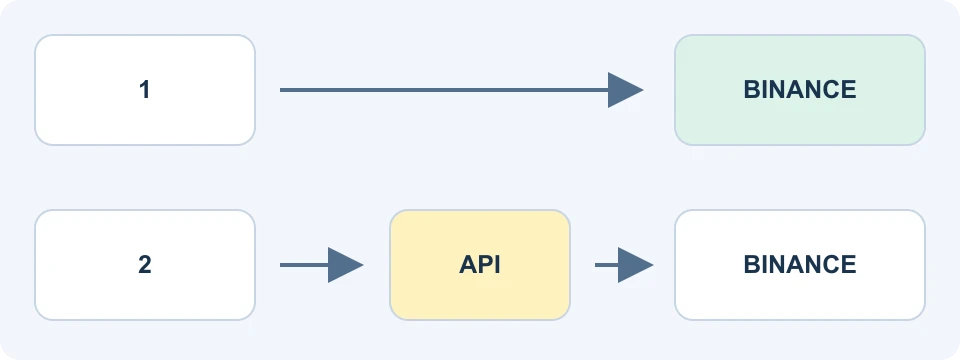
A useful first question is: who can change the rules while funds are committed? Record whether settings live in the exchange, on your device or with a vendor. An outside service going offline may stop new instructions without removing already placed orders. Check the actual exchange records before deciding that exposure has ended.
Limiting API permissions reduces what a credential can do, but trading permission itself can still produce losses. Never give a bot vendor your exchange password or wallet recovery phrase. A promise of guaranteed daily income is not evidence that the software or strategy is safe.
Choose by the rule being automated
| Bot family | Core rule | Question to resolve first |
|---|---|---|
| Spot Grid | Places buy and sell levels within a configured range | What inventory remains if price moves outside the range? |
| Futures Grid | Applies a grid to derivatives exposure | What margin, liquidation and funding risks apply? |
| Spot DCA | Adds purchases after specified price movements and manages a round exit | How much capital can all planned orders require? |
| Rebalancing | Trades to restore selected portfolio proportions | What assets and transaction costs does the rule create? |
| Auto-Invest | Makes recurring purchases on a schedule | Does that schedule fit the intended allocation? |
The product overview covers these families and additional tools. Availability differs by account and region. Similar names do not make their risks interchangeable; a Spot allocation and a leveraged derivatives position require different reviews.
In particular, Spot DCA responds to configured price deviations, while Auto-Invest is scheduled buying. A larger later order can lower an average entry while increasing the total amount exposed. Before accepting an order multiplier, add up the entire possible sequence rather than judging the first order alone.
Read the complete setup before creating a bot
- Confirm eligibility and account: use the product available to your own account and jurisdiction.
- Select the pair and bot family: distinguish the asset being traded from the asset used to measure its value.
- Record the rule: range, spacing, trigger, allocation, any multiplier and stop behavior.
- Read the preview: check minimums, order sizes, estimated costs and any initial market execution.
- Check the final confirmation: keep a record of the settings and starting balance before committing funds.
The account guide explains registration and verification, while the Spot order guide explains fills and pending orders. Neither opening an account nor passing verification means every bot product is available.
A preview is also an opportunity to reject a plan that you cannot explain. If you cannot state what causes another purchase or what ends the strategy, copying a preset does not resolve that gap. Write the rule in one sentence and compare it with the fields on the confirmation screen.
Grid spacing does not remove inventory risk
The Spot Grid guide distinguishes arithmetic spacing from geometric spacing. Arithmetic intervals have equal price differences; geometric intervals use equal ratios. Current grid limits and advanced options depend on the selected configuration, so use the current preview rather than a fixed maximum copied from an older tutorial.
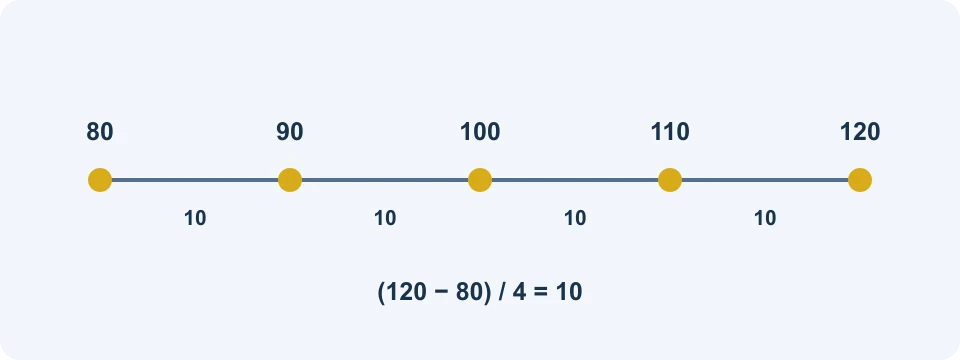
For this invented layout, subtract 80 from 120 to get a width of 40, then divide by 4 intervals to obtain 10. The arithmetic says nothing about the asset's fair value, available liquidity or future direction. It is a way to check that you understand the chosen spacing.
Now imagine the market moves below the range. Buying at earlier levels may have left the bot holding an asset worth less than its acquisition cost. A pause in new grid trades does not freeze that asset's value. If the market moves above the range, the bot may instead hold more of the quote asset and miss further gains.
Increasing the number of intervals makes each step smaller for the same range. That creates a practical question: is the amount allocated to an order large enough for minimums, and is the expected difference meaningful after execution costs? More lines on a chart are not evidence of more profit.
Positive Grid Profit can coexist with a loss
The Trading Bots Account FAQ distinguishes matched grid results from the value of remaining holdings. Read the definition beside each performance field. A positive result from completed buy-and-sell pairs can coexist with a larger decline in unmatched inventory.
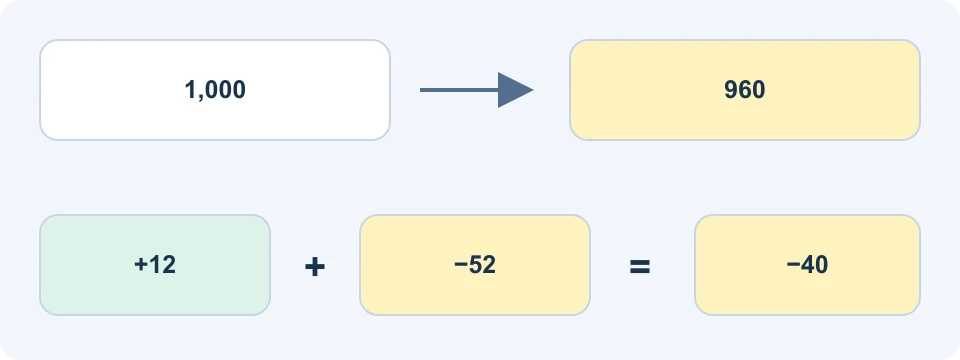
| Invented snapshot in quote-value units | Amount | Meaning |
|---|---|---|
| Starting portfolio value | 1,000 | Initial measurement, with no later deposits or withdrawals |
| Current portfolio value | 960 | Holdings valued at the snapshot |
| Net matched grid result | +12 | Completed pairs after their trading fees |
| Floating component | −52 | Remaining inventory's change in value |
| Overall change | −40 | Both components combined |
Calling this “12 earned” without mentioning the remaining loss gives an incomplete picture. Conversely, subtracting the matched fees again would understate the result, because the 12 is already net. Reconcile the chosen field to balances and use the same valuation time throughout.
If you added funds during the run, the current balance alone cannot establish performance. Keep transfers separate from trading results. For an unclosed strategy, the displayed inventory value is a snapshot, not a guarantee of the amount obtainable in a later sale.
Costs, funding and conditional fee benefits
Spot bots follow the applicable Spot trading charges; Futures bots can also involve funding and derivatives-specific charges. The account FAQ explains automatic funding movements into and out of the separate bot account. It also describes eligible BNB commission benefits that may be charged first and returned to the relevant trading account. Inspect the actual fee-return record rather than assuming the bot's first charge shows the final benefit.
For each run, keep matched commissions, unmatched inventory, transfers and any later rebate as separate records. A rebate received elsewhere should not silently disappear from your reconciliation, but a possible future rebate should not be counted as money already received. The fee guide covers the broader eligibility checks.
The Futures Grid guide includes realized profit, unrealized profit or loss and funding in its total-result explanation. It also distinguishes closing positions when a bot stops from keeping them open. Futures users should review margin and liquidation mechanics in the Futures guide before considering an automated strategy.
What “AI” parameters and Marketplace returns mean
The AI-parameter FAQ describes settings derived from historical data and technical indicators. A suggested range is a proposed configuration, not proof that software can reliably forecast the next market move. Check the chosen lookback and the resulting parameters before using them.
The Marketplace guide explains cards with metrics such as return, profit, runtime and investment requirements. Copying parameters starts a strategy under your current conditions. It does not reproduce the original entry price, execution sequence or holding period.
To compare two cards, write down their start dates, elapsed time, capital basis and whether the result includes open inventory. A high percentage over a brief favorable period is not directly comparable with a longer run through several market conditions. If the denominator or period is unclear, the percentage is insufficient for a decision.
Keep a record of your reason for selecting a rule before seeing its outcome. That helps distinguish whether the rule behaved as specified from whether the market happened to reward it. A backtest or attractive card can guide questions to investigate; it cannot verify future profitability.
Stopping the bot is only one verification step
Read the stop confirmation before accepting it. The Spot Grid FAQ describes a sell-base-assets option, but liquidity and amount protections can leave assets unsold. Futures has separate position-closing controls, including settings for different stop scenarios. Check the resulting records rather than treating the word “ended” as a balance statement.
For a complete exit record, capture the ending timestamp, outstanding orders, remaining asset quantities, any open derivatives position and the returned account balance. Match closing executions with their charges. If an amount remains unexplained, investigate it before starting a replacement strategy that could obscure the records.
Frequently asked questions
Are Binance bots free?
Do not confuse access to a native tool with cost-free trading. Executions and applicable product charges still matter. An outside vendor may also charge separately; inspect that service's current terms.
Can a bot guarantee passive income?
No. Automation executes rules in uncertain markets. A strategy can lose value, and leveraged bots can face liquidation. Monitoring and a clear exit plan remain necessary.
Does an AI label mean the bot makes every decision for me?
No. Read what the feature actually does. Historical parameter suggestions, automated order execution and an outside predictive model are different capabilities.
Does a referral discount apply to every bot cost?
No universal assumption is justified. Check the account, product, fee category and current offer terms in the VELIX offer guide. A maximum advertised benefit is conditional and is not trading profit.
Affiliate disclosure: FinanceVelix may earn a commission through its Binance referral link. Account, product and regional conditions apply. This guide does not report personal bot returns or promise investment gains.
Official educational references
- official bot overview ↗Source accessed: 2026-10-23
- official explanation of trading bots ↗Source accessed: 2026-10-23
- Spot DCA ↗Source accessed: 2026-10-23
- Spot Grid guide ↗Source accessed: 2026-10-23
- Trading Bots Account FAQ ↗Source accessed: 2026-10-23
- Futures Grid guide ↗Source accessed: 2026-10-23
- AI-parameter FAQ ↗Source accessed: 2026-10-23
- Marketplace guide ↗Source accessed: 2026-10-23